

Short answer: most small business websites take 2 to 8 weeks from kickoff to launch. A simple one-to-three-page site can be live in about a week once the words and photos are ready, a typical 5- to 8-page WordPress site takes 2 to 4 weeks, and a small online store takes 4 to 8 weeks or more. The building is rarely the slow part. The waiting is: for text, photos, logins and decisions.
A fun fact to start. WordPress's own documentation says installing it takes less than five minutes. So why did your brother-in-law's "quick website" take seven months? Because the five minutes were never the problem. The other seven months went on waiting for "the final final logo, v3 (use this one)". After 20+ years and 1000+ sites launched, I can tell you exactly where the time goes, and how to get most of it back.
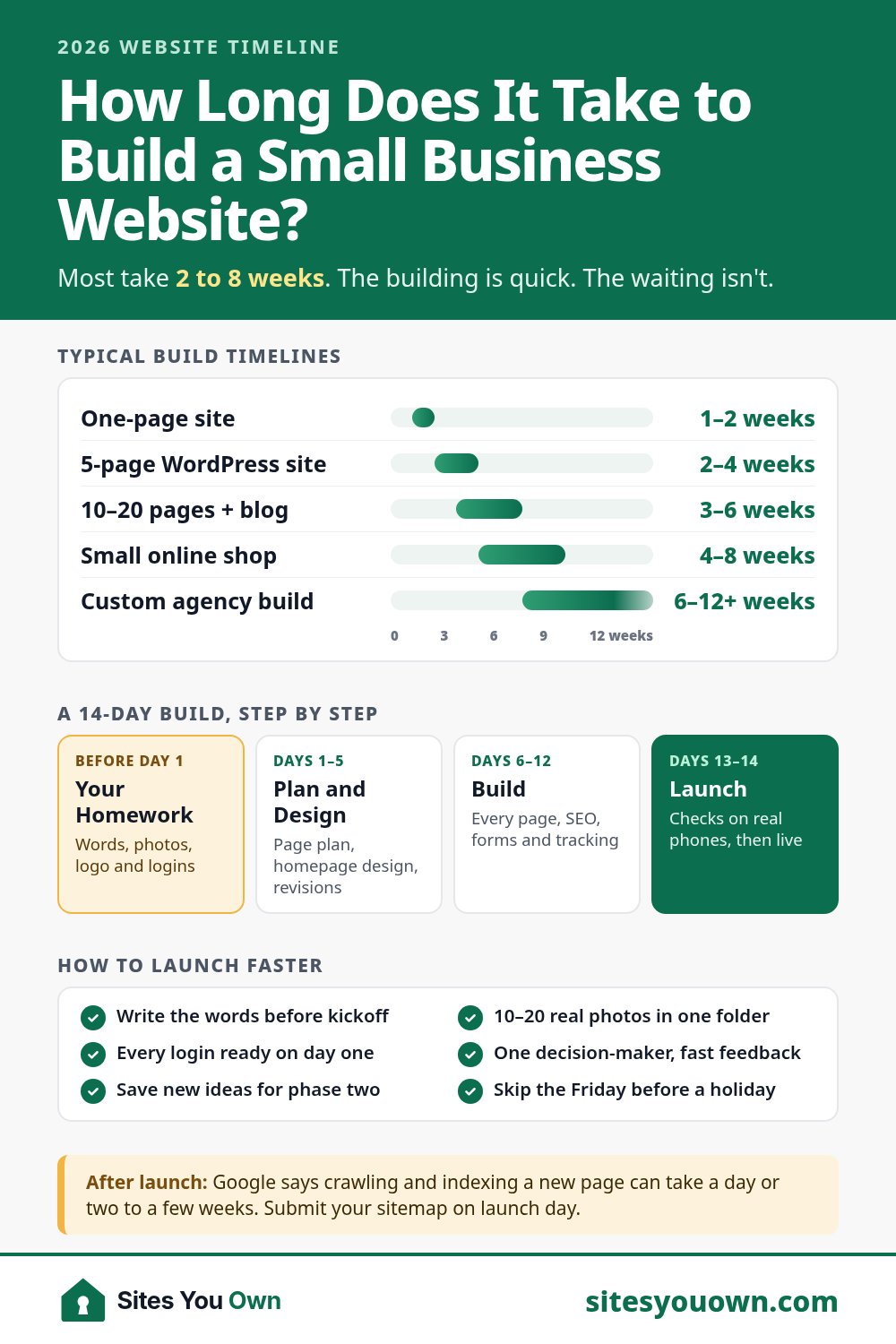
Typical Website Build Timelines in 2026
| Type of Site | Typical Timeline | What Usually Sets the Pace |
|---|---|---|
| One-page site / landing page | 1–2 weeks | One clear offer and the copy for it |
| 5-page small business site (WordPress) | 2–4 weeks | Your words and photos |
| 10–20 page site with blog and service pages | 3–6 weeks | Service page content and SEO setup |
| Small online shop (WooCommerce) | 4–8 weeks | Product photos, shipping and tax settings |
| Custom agency build | 6–12+ weeks | Meetings, approvals and custom features |
These are market ranges for the build itself, from kickoff to launch, the same ones in my website cost guide. They line up with GoodFirms' 2026 survey of more than 300 web development firms, in which 71% said a basic website takes 2–4 weeks and half said a mid-sized site takes 4–8 weeks (another 32% said 8–16 weeks).
Then there are the scary numbers. Clutch's pricing guide says most web design projects reviewed on Clutch last 7 months, and HubSpot puts a full professional build, including the time spent choosing a developer, at five to six months. Both are real, but they describe bigger projects with more people involved: the average project in that Clutch guide costs more than $38,000. For a landscaper, a food truck or a family dental practice, that's the wrong yardstick. Nobody needs a seven-month runway to publish their opening hours.
What Actually Happens, Week by Week
Here's how a typical 8-page small business site runs on my calendar. Other builders name the stages differently, but the order is much the same everywhere.
Before Day 1: The Homework
The words for each page, 10 to 20 real photos, your logo, and logins for your domain and any existing hosting. This is the step nobody puts on the timeline, and it's the one that decides the timeline. If your domain is registered to someone who now "mostly lives off-grid", sort that out first. Here's who should own your domain and hosting.
Week 1: Plan and Design
A short call to agree on the goals and the page list, then a homepage design for your approval, with two rounds of revisions. Not sure which pages you need? Start with the 10 must-have pages for a small business website.
Week 2: Build and Launch
Every page gets built, with on-page SEO, forms, Google Analytics and Search Console set up. Then come the final checks on real phones, the launch, and a training video so you can edit the site yourself. Honestly, this is the quick part.
After Launch: Google Catches Up
Going live doesn't mean Google shows your site the next morning. Google says crawling and indexing a new page can take anywhere from a day or two to a few weeks, and suggests allowing at least a week after submitting a sitemap before assuming something's wrong. Its Search Console help also notes that indexing is never instant, even when you request it. And being indexed isn't the same as ranking. Showing up for "landscaper near me" takes longer, and depends on your competition and your local SEO.
The 7 Things That Actually Slow a Website Down
The GoodFirms survey lists content delays among the hidden costs of a website project, and one agency CEO put it plainly: "Missing copy, images, product data, legal texts, or translations can slow a project more than the technical work." That matches what I see. Here's the full list, roughly in order of damage.

1. The Words
"I'll send the text next week" is the most expensive sentence in web design. It's usually true the first time. If writing isn't your thing, a rough draft in your own words, or even a voice memo, beats a blank page every time.
2. The Photos and the Logo
A site can be finished and still wait three weeks for "a proper photo shoot" or a logo that's "almost there". Launch with good phone photos taken in daylight, and swap in the professional ones later. Websites are editable. That's sort of the point.

3. Logins Nobody Can Find
The domain registrar account, the old hosting, the Google Business Profile. One missing password can stop a launch dead, usually on the morning you planned to go live. Find them all before Day 1.
4. Decisions by Committee
One decision-maker approves a design in a day. Two business partners, a board and a spouse with "just one small thought" approve it in two weeks, then reopen the homepage. Pick one person who gets the final say.
5. Slow or Scattered Feedback
Feedback in one list, within a couple of days, keeps a project moving. Feedback in 14 texts, three emails and a voicemail recorded at a Little League game, spread over a month, does not.
6. Scope Creep
"Can it also take bookings? And payments? And maybe a loyalty program?" Each one is a fair request, and each one adds time (and cost). Put new ideas on a "phase two" list and launch first.
7. Things Outside Anyone's Control
Some steps run on someone else's clock. Google says Business Profile verification reviews take up to 5 business days, and if it offers you a postcard instead, most codes arrive within 14 days. Then there are holidays. Very little launches the week of Thanksgiving, because nobody, including you, is checking email.
How to Launch Your Website Faster (Without Cutting Corners)
- Write the words first. Even rough. Especially rough. A developer can polish a draft; nobody can polish a promise.
- Put 10–20 real photos in one shared folder: you, your team, your work, your van or your storefront.
- Gather your logins: domain registrar, hosting, Google Business Profile, and wherever your email is managed.
- Choose one decision-maker and agree on a two-day turnaround for feedback.
- Keep a "phase two" list for every new idea that arrives mid-project.
- Launch with the pages that sell (home, services, about, reviews and contact) and add the blog later.
- Don't pick a launch date the day before a long weekend.
How Long Does a WordPress Website Take to Build?
WordPress itself isn't the slow bit. The install takes minutes, and a lean theme with the block editor is quick to build on. What takes the time is the same as on any platform: design, content, setup and testing. Replacing an existing site adds one more job, which is mapping every old URL to its new page so you keep your Google traffic. The website redesign guide covers how, and my redesign service usually takes 2–4 weeks depending on the number of pages. Moving off Wix or Squarespace typically takes 1–3 weeks with a WordPress migration.
DIY vs Freelancer vs Agency: How Long Each Takes
- DIY with a website builder: the fastest start. HubSpot estimates one to two weeks, and in the GoodFirms survey nearly two-thirds of respondents expected an AI-builder site to be finished within two weeks. The catch is that the hours are yours, and builders come with monthly fees and limits on what you can take with you (see WordPress vs Wix).
- Freelancer: usually a few weeks for a small business site, because you talk to the person doing the work and there's no queue of status meetings. More on that in freelancer vs agency.
- Agency: more people, more process, more meetings. Great for complex projects with many stakeholders; slower than it needs to be for a 5-page site.
How Long It Takes With Me
I'm Jai. I work remotely from New Delhi with US-friendly hours (calls Monday to Friday, 9am–1pm US Eastern (ET)), and most of my clients are small businesses in the US, UK, Canada and Australia. Every fixed quote for my small business website design service includes the timeline in writing, counted from the day your content is ready:
- Starter (up to 3 pages, from $349): live in about 7 days.
- Business (up to 8 pages, from $699): live in about 14 days.
- Growth (up to 20 pages plus a blog, from $1,399): live in about 21 days.
Business and Growth projects come with a content template, so you know exactly what to send, and every project gets Loom video updates while I build. Your domain, hosting and every login stay in your name. See the pricing page, the 14-day process, or web design for US small businesses. Planning a site for a trade? Here's how I approach landscaper websites and restaurant and cafe websites, or browse recent work such as the Roser Lawyers website. After launch, care plans from $29/month keep it updated, or follow the WordPress maintenance checklist yourself.
Got a launch date in mind? Book a free 20-minute call and I'll tell you honestly whether it's realistic and what you'd need to have ready. Or ask for a fixed quote and get the price and timeline in writing within 24 hours.