

Short answer: you do. Not your designer, and not your cousin who "knows computers". Your domain should be registered to your business, with your own email address on the registrant record, inside a registrar account you can log into. Your hosting should be in your name and billed to your card. Your designer gets their own user access to both, never the master keys. And if you're in the US, paying for a website doesn't automatically make you its copyright owner, so get that bit in writing too.
That's the whole article. The rest is for anyone reading this with a slightly sinking feeling.
A Story That Is Completely Made Up (and Yet Weirdly Familiar)
Picture a bakery. Purely hypothetical. Years ago the owner's nephew built the website over a long weekend. He bought the domain on his own card, set up hosting with his personal email, and picked a WordPress password that lives only in his head. There was cake.
Fast forward. The nephew now lives in Goa, teaches surfing, and replies to WhatsApp on a schedule best described as lunar. The domain's renewal reminders have been landing in his inbox, unread, somewhere between a pizza coupon and a newsletter he keeps meaning to unsubscribe from. Then one Monday the bakery's website and its email go dark on the same morning. Nobody hacked anything. A reminder just went to the wrong person.
Notice there's no villain here. This kind of mess tends to start as a favour or a shortcut, not a scheme. The trouble shows up years later, when people move on. I didn't name my business Sites You Own by accident.
Who Should Own What: The Quick Version
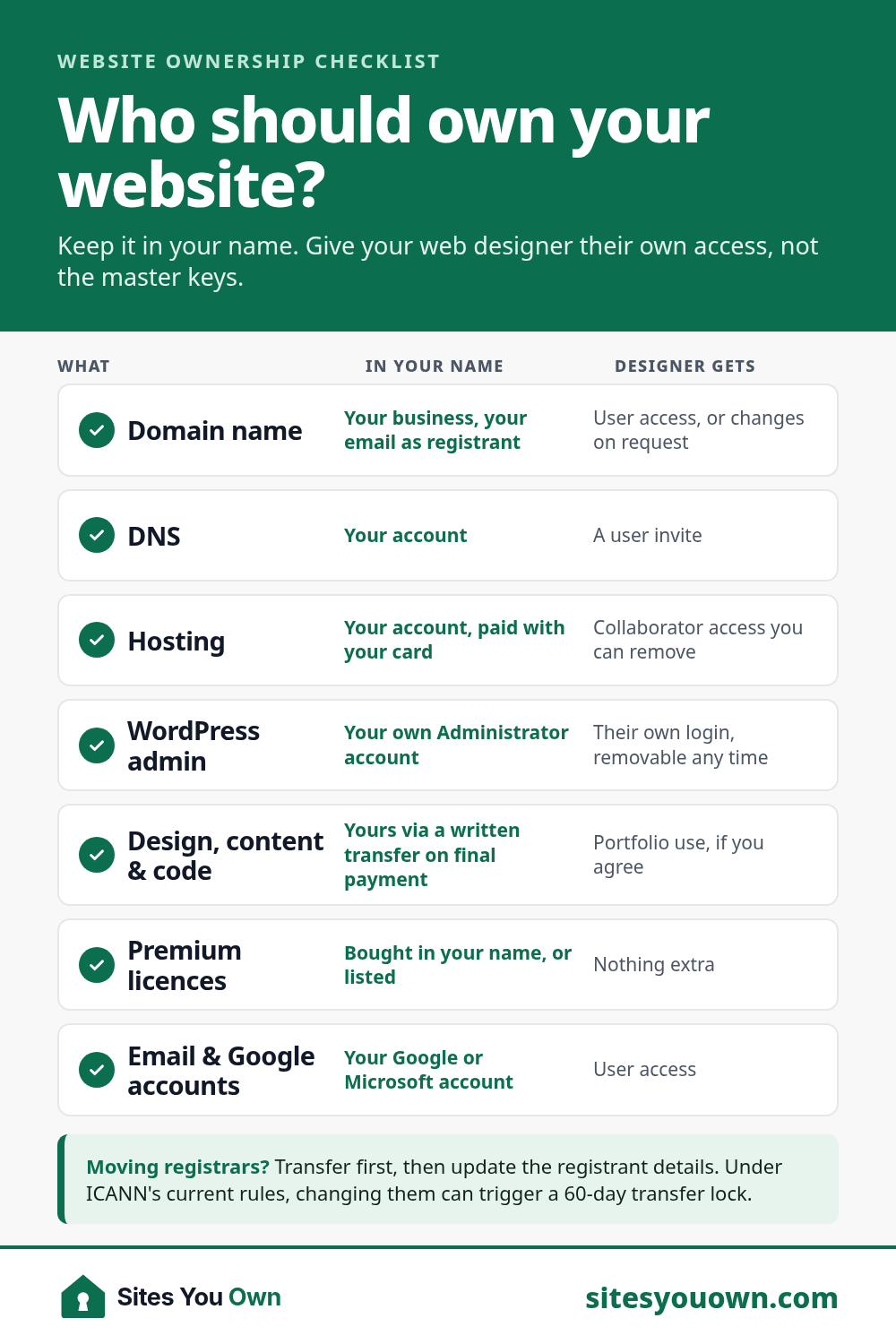
| What | Whose Name It Should Be In | What Your Designer Gets |
|---|---|---|
| Domain name | Your business, with your email as registrant | User access to the registrar account, or changes on request |
| DNS (registrar or Cloudflare) | Your account | A user invite |
| Hosting | Your account, paid with your card | Collaborator or user access you can remove |
| WordPress admin | You hold your own Administrator account | Their own login, removable any time |
| Design, content and custom code | You, via a written transfer on final payment | Permission to show it in their portfolio, if you agree |
| Premium theme and plugin licences | Bought in your name, or at least listed | Nothing extra |
| Email, Analytics, Search Console, Google Business Profile | Your Google or Microsoft account | User access |
Your Domain: The One Thing You Really Can't Lose
Your domain is your address online, and usually your email address too. Lose it and both vanish together. A website can be rebuilt in a few weeks. A domain printed on your van and four thousand visiting cards is harder to replace.
Whoever is listed as the registrant is the domain holder as far as the registrar is concerned. And the email on that record matters more than people expect.
Why That Email Address Matters So Much
Quick test. Is your domain registered to a personal Hotmail address someone created in 2009 and last opened during a cricket World Cup? Worth checking before the domain checks for you.
Under ICANN's Expired Registration Recovery Policy, registrars must send at least two renewal reminders, roughly a month and a week before a domain expires, and those reminders go to the registrant email on file. If that's your old designer's address, you'll never see them. If the domain lapses, the registrar disrupts the website and email so someone notices (a polite way of saying your phone starts ringing). After deletion there's a 30-day redemption period in which the registrant can still restore the name, usually for an extra fee.
One business owner on Quora described the exact trap: their developer registered the domain in the owner's name but with the developer's email, then refused to change it. Name on the record; control of nothing.
Moving a Domain Needs a Code Only the Holder Can Get
To move a domain to a different registrar you need its Auth-Code (also called an EPP or transfer code). ICANN's rules say the registrar must either let the domain holder generate that code in the control panel or provide it within five calendar days of a request. Whoever controls the registrar account controls the code. So "it's in your name" is half an answer. You want the login too.
Hosting: Your Card, Your Account, Their Access
Hosting is where your site's files and database live. Most small-business WordPress sites run happily on hosting somewhere around $5 to $30 a month, and I'd always rather a client pays the host directly than pays me a marked-up fee for the same server. (Full running costs: what a small business website costs.)
The old way to give a designer access was to WhatsApp them your password and hope for the best. You don't need to do that anymore. Decent hosts let you invite people with their own logins. On SiteGround, for example, you add a collaborator from the Manage Users screen and they accept an email invite. Kinsta lets you invite users with specific roles, so a developer never sees your billing. When the project ends, you remove them. No awkward emails.
What about designers who host every client on their own server and bill you once a year? It isn't always a bad deal; some include proper backups and support. But first ask: "If I leave, will you give me a full backup and help me move, and is that in writing?" If the answer is a long pause followed by "we'll figure it out", that is the answer.
The Website Itself: Paying for It Isn't the Same as Owning It
This one surprises people. The US Copyright Office is blunt about it: when you hire an independent contractor to build a website, the contractor is considered the author and copyright owner, not the business that paid. To own the rights, you need a signed written agreement that transfers them to you. Rules differ by country; the safe habit doesn't: get it in writing.
In practice, look for a line in your contract or proposal along the lines of "on final payment, all rights in the design, content and custom code pass to the client." It's fair for a designer to keep portfolio rights. Nobody can hand you ownership of things they don't own, like WordPress, a premium theme or stock photos, so ask for paid licences to be bought in your name, or at least listed with renewal dates.
Wix is a different question. You can own the domain, but the site lives on their platform and can't be exported as a working copy. Lovely furnished flat; you're renting. Trade-offs are in WordPress vs Wix and, if you've outgrown a builder, a Wix or Squarespace to WordPress migration moves you to something you can take anywhere.
Already Stuck? A Calm Hostage Negotiation in Five Steps
If your domain or hosting sits in someone else's account right now, breathe. And don't let it expire in the hope of swooping in afterwards. ICANN warns that during a registrar's grace period an expired name may be offered to other buyers or auctioned, depending on the registrar's terms. That's not a rescue plan; it's a raffle. Work through this in order instead:
- Find out where the domain is. Search it on ICANN Lookup. You'll usually see the registrar and the expiry date, even when the owner's details are hidden by privacy protection.
- Gather your paperwork. Contract, invoices, receipts, and any emails about the domain or hosting. Proof of payment helps a lot.
- Ask in writing, and keep it friendly. Ask for the domain to be moved into a registrar account you've opened, or for the transfer code plus an update of the registrant details to you. For hosting, ask for a full backup (files and database) and your own WordPress admin login. Honey before lawyers.
- Do things in the right order. Under ICANN's current Transfer Policy, changing the registrant's name, organisation or email can trigger a 60-day lock on moving the domain to another registrar, unless that registrar offers an opt-out. If you plan to switch registrars anyway, transfer first and update the details afterwards. ICANN's Board adopted transfer policy changes in June 2026 that will remove this lock, but they're approved, not in effect. They still have to be implemented, so plan around today's rules.
- If they refuse, escalate. Contact the registrar with your evidence and ask about their dispute process. If real money or your trademark is at stake, a letter from a domain-dispute lawyer often settles things quickly.
With luck, step three does the job. My hunch is that the person sitting on your domain usually isn't plotting anything. They're more likely swamped, and a bit embarrassed about the mess. Make yes easy. And if you want the site back so you can finally fix it, that's often the start of a website redesign.
Your Handover Checklist (Before You Pay the Final Invoice)
- The domain is in a registrar account you log into, with you as registrant and your email on the record.
- Auto-renew is switched on, with your card on file.
- The hosting account is yours, and the designer is a user you can remove.
- You have your own WordPress Administrator account, not a shared "admin" login with the password admin123.
- You've received a full backup and know where the automatic backups are kept.
- Your contract or proposal says the design, content and custom code are yours on final payment.
- Premium theme and plugin licences are listed, along with who renews them.
- Google Analytics, Search Console and your Google Business Profile belong to your account, with the designer added as a user.
- Your business email runs on an account you control.
Use this list with any designer you hire, me included. Especially me. It works for a freelancer or an agency (my take on freelancer vs agency).
How I Handle Ownership on My Own Projects
Every project I take on starts with your domain, hosting and admin accounts in your name. No domain yet? You register it and add me as a user. Hosting is paid directly to the host. At launch you get full admin access, and my terms say plainly that the website, content and design files are yours on final payment. If we ever part ways, you take everything with you. No negotiation. That's the whole point of the name.
Prices are fixed and written down before work starts: $349 for up to 3 pages, $699 for a business site of up to 8 pages and $1,399 for up to 20 pages with a blog. See the pricing page for what's included, or get a quick estimate from the website cost calculator. If you'd rather skip updates, backups and renewals, care plans start at $29/month and you can cancel any time. See finished sites on my work page, like the Roser Lawyers website for a Sydney commercial law firm, or browse websites by industry.
Not sure who owns what on your current site? Book a free 20-minute call and we'll work it out together, no hostage negotiator required. Or send me a message through the contact form.